
Festool DF500Q Domino
When I first heard of the Domino I briefly looked at the description and didn't pay any more attention to it. To me the Domino seemed to be another biscuit joiner and even though I own one, I was never a fan of them. Then Fine Woodworking Magazine published a web article on the Domino and the author used the Domino to make floating tenons for a small table. Well that piqued my interest. A lot of what I've been making in my hobby has been small tables and I usually use mortise and tenon joinery which tends to be time consuming for me. I started doing more research on the Domino and getting more and more excited in anticipation of the 1 April 2007 U.S. release date. Well, I got my hands on one thanks to Christian O. at Festool USA and I had just started preparing the stock for a cherry coffee table so the timing was perfect.
Like all my reviews this one will be loaded with detailed pictures and explanations of all the features and controls of the Domino. I'll also have a few movies where appropriate to better demonstrate the Domino. I'll document how I used the Domino in the construction of a coffee table where it is used for all the apron/stretcher joints as well as the table top glue up and since this is a first time use of the Domino for me, I'll pass on any hints or warnings that I discover along the way.
What's in the Box?

 The Domino DF 500 Q Set is shown in these two photos. The Domino Systainer (left) contains the Domino, Plug-It power cord, support bracket, wrench and documentation. Festool has had some problems in the past with tools bouncing around in the Systainers during shipment but I saw no evidence of that with the Domino.
 In the same shipping box will be the rest of the set which consists of the Cross Stop and Trim Stop (right), with included instructions. As with the Domino, we'll get into their use a little later in this review.

 If you want to use the Domino you'll need some Domino tenons and their respective cutters. The best way to get everything needed is with the Cutter & Domino Tenon Assortment Systainer (left). Packaged in a #2 Systainer, this set includes all four of the Domino cutters (right) plus an assortment of 1105 Domino tenons. Festool also included an extra set of labels for the tenons in case they wear off or you decide to make your own storage unit.
The Domino:

 Ok, I'm only going to make a couple of comparisons to a biscuit joiner and this one is only to show you the relative size of the Domino to a Dewalt joiner...something you can go to Home Depot and put your hands on. As you can see in the picture the Domino's body is slightly thicker at the handle or grip section. The Dewalt is just a little lighter a 6.8 lbs vs. the 7lbs for the Domino.
Please click on and enlarge the photo on the right for a reference to the controls as I explain them below.
Item No. 574258 includes, the DF 500 Q Domino Joiner:
(1) DF 500 Q Joiner
(1) D5 Domino cutter
(1) Support bracket
(1) Operating wrench
(1) Systainer 2
Item No. 574283, the DF 500 Q Domino Set includes all of the above plus the Trim Stop item no. 493487 and Cross Stop item no. 493488.
Specifications
| Power | 420 watts |
| Speed/Swivel | 25,500 rpm/ 15HZ |
| Jointing Depth (max) | 28 mm |
| Jointing Width (max) | 23 mm + Joiner bit diameter |
| Jointing Bit Diameter (max) | 10 mm |
| Drive Shaft Thread | M6 x 0.75 |
| Weight | 7 lbs |
| Degree of Protection | Class II (Double Insulated) |


These bottom views of the Domino show the dust port (top of photo at left) and the scribe lines on the base of the unit to aid in aligning your work.
Domino Controls:
 Ok, lets start looking over the controls of the Domino. Starting at the front is the fence, its operation is similar to the ones on biscuit joiners. At left is the angle scale (#1 on the reference picture from above) with ball bearing detents and locking lever. The detents are positioned at 0°, 22.5°, 45°, 67.5° and 90°. The picture at right shows the height locking lever (#7) which is located behind the fence on the right


The photo on the left is looking at the business end of the Domino. Notice two spring loaded guide pins (left pic, red arrows). These pins can be used to index the Domino off a mortise or the edge of the work. Apparently there can be some slight variation where the distance between one pin and the center of the mortise is slightly different from the other, probably caused by tolerances in the swivel mechanism for the bit. If you notice that this is the case the left hand pin (on the right as you look at the front of the Domino) can be adjusted slightly. There is an eccentricity adjustment on that pin (see photo at right) which can be adjusted to achieve equal distance of the two pins to center.
Also in the photo at left the blue arrows point to the friction pads. These pads help prevent the Domino from moving when pressed up against the work.

 Near the fence angle lock and on the rear of that post is the fence height scale (#2). This scale indicates the distance between the fence and the center of the bit. You will see and hear me talk about setting the step gauge for some value, lets say 25mm, but that means that the indicator will be aligned with 12-1/2 on the fence scale...half the value of the step gauge.
Why half the value? Because the step gauge value represents the stock thickness, so if the stock is 25mm thick, the center of the stock is at 12-1/2mm so that is what is displayed on the fence scale. When your stock thickness is not one of the preset steps, you simply divide the measured thickness by 2 and set the fence using the scale.
The fence also includes a viewing window (right) which is used to facilitate aligning the Domino to your work. I have used this to center the Domino on a pencil mark and I have used the scales to the left and right of center to center a piece without having to mark it. Your Domino may need to have its viewing window scale calibrated. Instructions for that procedure are included in Rick Christopherson's excellent Domino manual.

 The photo at left shows the selection window of what Festool calls the height selection slide (#3)...I call it a step gauge. There are preset steps for 16mm, 19mm, 22mm, 25mm, 28mm, 36mm and 40mm. The picture on the right shows the fence resting on the 25mm step (highlighted in red).
On my unit I was initially having trouble placing the mortise at the exact center and then I noticed that fence scale was about a millimeter off from the step gauge. To remedy this I set the gauge at 20mm and positioned the fence. I then loosened the two Torx head screws which secure the fence scale and realigned the scale to the pointer.


On the same side of the Domino just to the rear of of the depth step gauge is the adjustment for milling depth (#4). There are two levers as shown in the picture on the left. In that photo the he far left lever is the locking lever and it must me depressed in order to move the notch lever which is the green one to its right. This operation requires two hands (photo on right) and can set the milling depth to any one of 5 depths, 12mm, 15mm, 20mm 25mm and 28mm. With these depth selections and the various length tenons you can have your mortises of equal depth on each piece or offset if needed. Festool took care of sizing the tenons a little shorter than their advertised length to allow room for glue so you can feel safe milling 25mm mortises for a 50mm tenon.  The final adjustment control we'll need to make our mortises is the tenon hole width knob (#5). This adjustment allows three mortise widths which equal the diameter of the installed bit added to 13mm, 19mm, and 23mm. So with a 10mm bit installed that works out to 23mm, 29mm and 33mm (see, I can add in metric). This adjustment should always be performed with the tool running to ensure proper engagement of the swivel mechanism.
The purpose of the larger mortise widths is for a couple of reasons. First, when using the smallest size the precise location of the mortise is very important because there is no play either vertically or horizontally so your pieces are going to line up where the tenon makes them line up. That being said there are times when you don't need such a precise location of your mortises...usually across the width of the tenon. An example of this is when using tenons to end join a panel. We are interested in vertical alignment because we want the panels to be flush at their faces but we probably don't care about horizontal alignment and having tight horizontal alignment will serve nothing but to make the joint more difficult to make. The second reason is wood movement. In certain applications having elongated mortises in a cross grain situation will allow for movement if you glue only one side. I am using this method for the shelf on the coffee table that I'm building for this review. Read the Domino in Use section of this review for more information.


The Support bracket can be used to add surface area to the face of the Domino to aid in stability. The Support is a simple right angle bracket that attaches to the base of the Domino with two thumb screws.
Domino Bits:

The Domino is shipped with a 5mm bit. There are Domino tenons in thicknesses of 5mm, 6mm, 8mm and 10mm and each different thickness requires a similarly sized bit. At right I'm holding the 10mm bit which is the largest Festool offers. The bits are sized so that they can be sharpened between 1 and 3 times before they are too short to create an acceptable width mortise. Festool says that the sharpening process can remove up to 1mm of material and still result in a useable bit. I measured all my bits and they averaged 48.75mm so that would make the minimum serviceable length after sharpening at 47.75mm If you decide not to sharpen fear not, Festool reports that the bits will last about 4,000 mortises when milling into the end grain of hardwood and 15,000 when milling into the side grain of soft wood. Those numbers are at the two extremes of the scale so we're likely to get something in between. In any event if the bits come close to that lifespan most of us will probably just buy a new one rather than sharpen them.
For those of you wondering how the Domino bit could last that long, the answer is two fold. One reason is that the bit is carbide tipped but that isn't really the main reason for the longevity. The Domino bit unlike a drill bit is always moving. A drill bit turns and turns over and over at the same spot generating heat and wear. The constantly moving Domino bit avoids most of the conditions and stresses that cause a normal drill bit to wear out.
Below are more shots of the 10mm bit. In the first photo on the left you can clearly see the carbide tip.


The Domino Tenons:

The Cutter & Domino Tenon Assortment really should be your first accessory purchase for the Domino. In this kit you get a set of all four cutters; 5mm, 6mm, 8mm and 10mm, a number 2 Systainer which is divided and labeled into six compartments (pic right) and 1105 domino tenons. The tenons include 600 each of the 5x19x30mm, 190 each of 6x20x40mm, 130 each of 8x22x40mm, 100 each of 8x22x50mm and 85 each of 10x24x50mm. Festool also includes some spare labels in case the labels wear off from the plywood dividers or for use when you make more tenon storage.


Here they are. The larger ones are pretty substantial. I see myself using the 10x50 quite often. The 5x19x30mm tenon is thicker and will penetrate further than a 4x56x23mm #20 biscuit it will likely replace. The Domino tenons are made from solid birch and as such are dimensionally stable in comparison to compressed beech biscuits and should not be affected by the humidity in your shop. The tenons do have glue ribs on the long edges and embossed Festool branding and recesses which will expand once a wet glue hits them.


At left is a Domino tenon. It has side flue flutes and is embossed for both identification and to hold glue.
In an effort to find out how stable the Domino tenon is I submerged this tenon in a glass of water for about 15 hours. I measured its thickness before placing it in the water and it averaged 8.05mm. After 15 hours I removed it and measured it again, it measured 8.20mm on average. That is a growth of .15mm or .006". I'm not sure what this test proves or how I could equate 15 hours in water to the humidity in my shop but it does look to me that the tenon is dimensionally stable.
Changing the Bit

Included with the tenon assortment above is a set of all four Domino bits. Again that's 5, 6, 8 and 10mm. The bits come packaged in a nice plastic case and even the case is labeled so that when you're searching the shop for that missing bit that you just had in your hand, you know which one you're looking for :).
The bits screw on to the drive shaft or arbor which is threaded for a M6 x 0.75 thread.


On the opposite side from the mortise width selector is the unlocking latch (photo left) There is a lever on the fence piece that passes beneath this latch and hooks on it so that the front fence cannot come loose from the Domino motor body. In order to change the bit we need to remove the front end so using the included bit wrench, gently pry up the latch (pic right). Just insert the wrench in the opening below the latch and pivot the wrench down. You'll hear it "click" and feel the motor body release and spring back away from the fence.

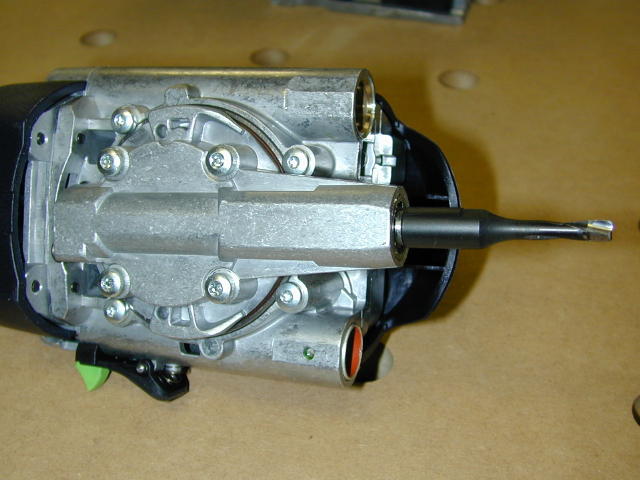 Continue to pull the motor body back away and apart from the front fence assembly. Before we change the bit let's turn in over and look at the bit mechanism (right). If you double click on the photo at right a closer view will be displayed where you can clearly see the bit swivel mechanism. It kind of looks like a turret on a tank. The 5mm bit is installed in that photo.

 And here is a front on view of the motor body (left). The two holes are the front of the motor body are the guide tubes for the posts on which the guide frame (right) or what I call the fence assembly slides or more accurately plunges on. When you assemble the body to the guide frame you just align it and slide the posts into the tubes.

 Now we're ready to change the bit. On the right side of the motor body is a arbor lock (circled in red at left). We will need to grip the motor body and depress this lock with one hand while we unscrew the bit using the wrench with the other (right). This is the standard threading, clockwise to tighten and counter clockwise to loosen. The flats for the wrench are machined into the base of the bit. The vacuum hose connection for dust collection can also be seen in the photo at left.

 Once the bit is loose you can unscrew it by hand as I'm doing in the photo at left. The best way for me to explain this operation is with a short video where you see the entire process and I even run the Domino so you can see the bit movement. Just double click on the video link at right.
Accessories: Trim Stop

 The Trim Stop another indispensable accessory. The Trim Stop is a fence accessory that aligns and secures your work for an end grain mortise (bottom view on left). If you cutting mortises in a bunch of rails and stiles then this tool will greatly aid you in aligning the piece accurately and quickly. The Trim Stop is plastic (reinforced Nylon I think), slips on to your Domino fence, and creates adjustable fences perpendicular to your Domino face (right).


To install the Trim Stop first make sure that you loosen and slide all the way back towards the outside of the Trim Stop the locking clips. My finger is pointing to one in the photo at left. Once that's done just slide the Trim Stop on to the Domino's fence until it is fully seated. Push the clips forward so that they lock into the recesses on the Domino fence (right) and tighten. Now the Trim Stop is ready to use.


These pictures demonstrate two way to align the measured center of the board width to the Domino. At left I'm using the scribe lines on the base of the Domino and at right I'm using the scale on the viewing window.
If you are milling an exact fit mortise where exact placement in both axis is required, I suggest you use the scale on the viewing window for the alignment simply because you can calibrate it to your specific Domino. Instructions for that procedure are included in Rick Christopherson's excellent Domino manual.
Accessories: Cross Stop

 The cross stop is a handy accessory which allows you to place mortises on both pieces of work without measuring and marking. The Cross Stop lends itself to speedy, accurate panel glue-ups and is great to use when the actually position of the mortise along the work isn't important, but the relative position of the mortises on the two parts to be joined is what is important. Examples of applications where it will be useful are panel glue-ups like I've already mentioned and carcass and shelf assembly.
The Cross Stop is two outrigger-like assemblies which are basically a scale and a movable pin. These assemblies attach on either or both sides of the Domino base plate with a dovetail joint (right).

 Each outrigger has a scale and a moveable, lockable guide pin. This pin is used to index the Domino from a previously cut mortise.
The Cross Stop operates much in the same way of an indexing shelf pin jig. You set the moveable stops or guide pins to the distance you choose between your mortises. Then you mill your first mortise, and each subsequent mortise is indexed off the previous one. The photo at right shoes the Cross Stop Guide Pin "hooked" into a mortise and indexing the Domino for the next plunge. Another previously mentioned aspect of indexing is the use of the two built in guide pins. These stops are great to position your first mortise on the piece and they use the edge of the work as the reference point. I always place my first mortise when using the Cross Stop with the Domino's built in stop pins.
The Domino In Use:
I was lucky enough to receive the Domino for review while I was just beginning a coffee table project. This was both good news and bad news. I was planning on building the table with integral mortise and tenon joints so from that perspective the timing was perfect. The bad news, or maybe more accurately the challenge in using the Domino for this project was that I ran the risk of making mistakes and not ending up with a table that I'd feel good about giving to my middle daughter to finish out her living room table set.

I'm not going to go into all the steps in making this coffee table but at left you see me sanding the legs and apron pieces in anticipation of taking the Domino to them. In the case of these pieces one can really completely finish sand them prior to mortising because the Domino operation in this application will not require any sanding.
Once the parts were sanded I carefully selected and marked each part so I knew which face would be facing the outside of the finished table. This is very important because we will use the "outside" face of all parts, including the legs, to reference the Domino from. Doing it this way allows us not to have to be extremely precise when finding the center of the thickness of a piece. When using more traditional power tools for M&T joinery; a Bench Top Mortising machine, Table Saw Tenon Jig or a router and jig, our process is to find the exact center for the tenon. That is accomplished by either the tool itself like in the case of the table saw jig or our own techniques like reversing you piece and running it through the router again to find the exact center, as examples. With the Domino there really isn't a need to be so precise as long as you make all your reverences from the same side of the piece. I've rambled on about this and I hope I didn't give you the impression that we're not placing mortises at the center line of the piece, it's just that for me, when I talk about the exact center of a piece, I really mean exact as measured by an accurate measuring device and with the Domino there just isn't the need to be that precise. Not having to worry about those exacting tolerances also greatly speeded up the process for me. Once I had the boards marked for the outside I used a rule to mark the position of the mortises, much like one would with a biscuit joiner.

If you click on the video on the right you will see a full length video of me cutting mortises in the apron and legs. I did have to edit out a bit about halfway through the video because I had a bout of reverse hallucination....you know, not seeing something that's right in front of you. I was looking for my gauge block and couldn't find it so I uttered a few expletives and had to do an edit. It is somewhat a long video at about 6 megabytes but I wanted you to get a feel for exactly how long it takes.
In this video please remember I am literally using the Domino for the first time so I'm being very careful and slow plunging. I didn't know how fast or slow I could plunge the mortise so I was taking it extremely slow so as not to ruin the piece....I'm much quicker now.
You'll also notice that I use one exact fit mortise and one wide mortise. If I was do do this over, with the exception of edge joining, I would use all exact fit mortises because now I know that I and the Domino can place those mortises precisely where I want them. The last mortises I made were in the stretchers for the shelf and each of those joints has two exact fit 8x40mm tenons and fit is perfect.

 At left you see the parts all milled and some Domino tenons inserted in the legs for a dry fit. If I subtract the overhead for making the video I would say that the process of measuring and marking the parts as well as using the Domino took about a half an hour. Conversely, the process of making integral M&T on a very similar piece using a bench top mortiser and a table saw tenon jig took me the better part of an afternoon. For comparison, the photo at right are similar parts for a matching end table made with integral tenons.


The results of the dry fit were perfect. With traditional joinery I'd be spending a considerable amount of time fitting the joints with my shoulder plane. I'm going to have to put a heavy coat of wax on my Lee Valley shoulder plane so it doesn't rust while sitting in the drawer.
 The next step was to edge join the boards which will make up the table top and shelf. I was very apprehensive about using the Domino initially for this operation because my luck with using a biscuit joiner for this operation was less that acceptable. Remember what I said above about my definition of exact and apply that same expectation to the alignment of the boards. I found that with a biscuit joiner I could never achieve an exact joint and I was afraid that the Domino would disappoint me is this area as well.
If you click on the video link at left and listen to my voice when I feel the joint I think you will hear my surprise and delight at the quality of the joint. I can tell you that I will now always use the Domino for this application as it will make alignment easier and I don't have to worry about the boards moving out of perfect registration as I'm tightening and adjusting the clamps.

 My table has a shelf and I wanted to use the Domino to attach it. I like hiding the joint in a dado but certainly the tenons provide all the deeded strength so that it could be a butt joint.
So I milled 5 mortises in both the shelf edge and the stretcher and then used my router table to create a shallow mortise, about 3/16" deep (right). The center mortise I milled I made exact fit and this tenon will be glued into both the stretcher and table, the rest I milled at the medium width and they will not be glued.


I wanted to use the 8mm tenons and they are 40mm in length. This posed a little problem because the mortise in the stretcher could only be 12mm deep and the largest setting on the Domino is 28mm so 12+28=40 BUT I was going to set the shelf in a 3/16 deep mortise so now my tenon was 3/16" too long. To get around this I used the 40x8mm tenons cut down to about 30mm in length. A safe way to trim the tenons is with my SCMS and a jig. For the jig I simply milled an exact fit mortise in the end of a scrap, inserted the tenons and cut.

Another use for the Domino is to mill slots to receive what I call table buttons. I milled 2 slots per apron section and attached the top for the dry fit with table buttons.


Here's the coffee table in a final dry fit. I still have to edge treat the shelf and one final sanding but then it's time to glue it up. There are 42 mortise and loose tenon joints in this table, plus another 8 mortises for the table buttons and 20 joints (40 mortises) in the table top and shelf edge joining.

 These next two clips are not about using the Domino but you may be interested anyway. The first one (left) is a short clip showing how easy it is to square up a panel using the Multi Function Table and the ATF55 Plunge saw. The process is to first rip the top to width and then trim the ends on the MFT.
In the second clip (right) I'm applying a bevel to my table top, again using the MFT and the OF1400 Plunge Router. I could have used my router table but this panel was large enough that I thought hand routing would be easier...and it was.
Demonstrating the Accessories:
 This next clip demonstrates using the Trim Stop to facilitate end grain mortises. The Trim Stop is a real time saver and assures repeatability of the mortise placement on your work. I've mentioned throughout my videos that securing the work, in my opinion, is an important component to achieving accuracy with the Domino and the Trim Stop acts as a jig for positioning and securing you work. I see if being of value when you only have a few pieces to mill and you don't want to bother setting up a jig on your bench or when you're out on a job site and cant create a more elaborate jig. It is also a great accessory when you have a lot of pieces to mill as it does all the centering and securing work for you and leaves you only with coming up with some way to keep the work from moving away from you when you plunge.

I had created my table tops by using the traditional way of measuring and marking the position for the tenons so when it came to demonstrating the Cross Stop I didn't have an actual project piece to use. I devised a demonstration using a couple of short pieces of plywood. In order to show you how accurately the Domino with Cross Stop could place the mortises, I've used the exact fit size for the mortise and rather than starting at one end and moving down the board, I cut two mortises from one end and two from the other. With this test not only am I demonstrating the repeatability of the Domino and Cross Stop but I'm compounding the possible error by indexing of of each end of the boards.
On a real panel edge joining project I would probably cut my first mortise using the stop pin built in to the Domino (as I did in this test) and would simply use the Cross Stop to mill mortises all the way along the edge until I got close to the end and then only if need be, make my final mortise using the opposing stop pin indexed off the far end of the board.
Problems and Tips:
The only "problem" I had with the Domino was that it needed to have its Fence Scale and Centering Scale adjusted or calibrated. Thanks to the great new manual by Rick Christopherson, instructions for the centering scale are included but there wasn't enough time to include the fence scale. Since the user needs to rely on these scales to achieve accuracy and alignment, my recommendation is that the instructions for the fence scale be added, and the calibration of these scales be be moved to the beginning of the manual for setting up the Domino.
A shortcoming I found with the Domino is the lack of an infinitely adjustable plunge depth. The Domino comes with 5 preset stops for the plunge or mortise depth and they work fine for 99% of applications but for thin pieces it would be nice to be able to fine tune the depth. Rick's manual explains a fairly simple work around for this issue.
The last annoyance are the built in stop pins. Don't get me wrong they work great when you're using them but when you aren't they can mess up your mortise placement if you're not careful. On a number of occasions when milling mortises close together the stop pin would catch in the adjacent mortise and misalign the Domino causing me to have to back the Domino off and carefully move the Domino until I was past the mortise before pushing it up tight to the work to align it. It would be nice if the pins had a slot in the end and threads on the far end so when not in use one could push them in and lock them in the recessed position.
Other than those just mentioned, I really don't have anything else to complain about with the Domino.
 As for tips, the Domino is a pretty straight forward tool to use. Tip number one is to calibrate both the fence and centering scales and to use the centering scale in the fence as your primary scale for accuracy and only use the scribes on the base of the Domino when precise placement of the mortise is not as important.
Tip number two is to use the left and right triangular windows on the fence to confirm that your guide pin is up flush against the edge of the board. If it is it will be centered in the window as shown at right.
Tip number three is to be careful when aligning the scale to the work with the Domino running. The swivel action of the bit causes the Domino the "shake" laterally when held in your hand causing you a little more effort to line the centering scale up with mark. Additionally when the Domino and vacuum are running, the Domino "sticks" to the work from the suction. This too makes aligning a little more difficult and can even feel like your stop pin is engaged when it is not...so be sure to remember the tip above when using the stop pin.
Conclusion:
I believe the Domino produces accurate mortise and loose tenon joinery at a speed and ease that I've never experienced. The Domino will be utilized from now on for all my mortise and tenon joinery where design permits. I'm not sure if my work qualifies as the work of a craftsman yet but if it did I would qualify myself as a modern tool assisted craftsman and not a "Neander". That being said I consider the joinery created by the Domino to have the same quality and craftsmanship as other power tool assisted joinery. This is not biscuit joinery. Because I achieved an accuracy in my panel glue up with the first use of the Domino, something I never could do repeatedly with my biscuit joiner, I will be using the Domino exclusively and my Dewalt plate joiner is going on Craig's list.
As with all Festool tools the Domino comes with a 30 day no questions asked guarantee. Their 1yr +2 yrs Warranty where Festool pays shipping both ways for product failures during the first year and return shipping for the last two years of the warranty. Also as with every Festool tool I've used the Domino exudes Festool quality in every aspect of the tool.
I hope that with this review I've shown you enough of the tool and its use that you can make an informed purchase decision. Would I recommend that you purchase the Domino? That is a decision only you can make but I believe that the Domino lives up to all the hype and expectations, performs at least as well as advertised, is a real time saver while creating high quality joinery.

onlinetoolreviews.com is a participant in the Amazon Services LLC Associates Program, an affiliate advertising program designed to provide a means for sites to earn advertising fees by advertising and linking to amazon.com.
All content © 2019 onlinetoolreviews.com | Terms & Conditions | Privacy Notice | Sitemap