The Best Cutting Machines for Vinyl and Paper: Cricut vs Silhouette
Four cutting machines for decals, stickers, cards and iron-on: three Cricuts and a Silhouette, and how to choose between the two systems.
November 10, 2026 · by Nate Calder
Our pick · Best Overall
Cricut Explore 5 Essential Bundle
Who it's for: Most people starting with vinyl, iron-on and paper.
Disclosure:As an Amazon Associate we earn from qualifying purchases. This costs you nothing and never changes which tools we recommend. Read more.
The short answer
- 1 Best Overall: Cricut Explore 5 Essential Bundle
- 2 Best Alternative to Cricut: Silhouette Cameo 5 12 in Vinyl Cutting Machine, Matte Black
- 3 Best Small Machine: Cricut Joy 2 Essential Bundle
- 4 Best for Fabric and Thick Materials: Cricut Maker 5 Essential Bundle
Cricut and Silhouette make the two cutting machines most crafters choose between. The machines are close; the difference is the software and how you buy materials.
Cricut or Silhouette?
- Cricut has the easier app, Design Space, and far more beginner tutorials. Many designs need a Cricut Access subscription, and the long matless cuts need Cricut’s own Smart Materials.
- Silhouette uses Silhouette Studio, which is more capable for designing your own files and harder to learn. The Cameo 5 cuts long lengths off ordinary roll vinyl, which suits people who sell what they make.
- If you are not sure, start with Cricut. Most tutorials, projects and friends who can help will be on Cricut.
Which size?
- Cards, labels and mug decals: the Joy 2 is enough.
- Shirts, signs, wall decals: a 12 inch machine, the Explore 5 or Cameo 5.
- Fabric or thick materials too: the Maker 5. See our cutting machines for fabric guide.
What else you’ll need
Budget for vinyl, iron-on, transfer tape and a weeding tool. Iron-on needs a heat source: a household iron works for small jobs, a heat press for regular shirt-making.
Shopping the sales? See Black Friday maker deals.
Cricut
Explore 5 Essential Bundle
Cricut's current mid-range machine, released in February 2026. It cuts 11.5 inches wide on a mat and up to 12 feet long on Cricut's Smart Materials with no mat, which covers decals, shirts, signs and cards. Cricut says it is 30% more compact than the generation before.
- Who it suits
- Most people starting with vinyl, iron-on and paper.
- What it does well
- Long matless vinyl cuts and fast everyday crafting.
- The trade-off
- Many designs in Design Space need a Cricut Access subscription, and matless cutting needs Cricut's own Smart Materials.
Check the link for current pricing.
Silhouette
Cameo 5 12 in Vinyl Cutting Machine, Matte Black
Silhouette's 12 inch machine. It cuts 12 x 24 inches on a mat and up to 16 feet off a roll, handles material up to 3 mm thick, and connects by USB or Bluetooth. It runs Silhouette Studio instead of Cricut Design Space.
- Who it suits
- Someone who sells decals or stickers, or who wants to avoid the Cricut ecosystem.
- What it does well
- Long roll-fed cuts in ordinary vinyl, not just one brand's.
- The trade-off
- Silhouette Studio has a steeper learning curve, and fewer beginner tutorials exist than for Cricut.
Check the link for current pricing.
Cricut
Joy 2 Essential Bundle
Cricut's smallest cutter, released alongside the Explore 5. It cuts 4.5 inches wide and up to 4 feet long on Smart Materials, and adds a Print Then Cut sensor for stickers.
- Who it suits
- Someone making cards, labels and small stickers in a small space.
- What it does well
- Quick small projects without setting up a big machine.
- The trade-off
- 4.5 inches wide. Anything larger than a card, a label or a mug decal needs a bigger machine.
Check the link for current pricing.
Cricut
Maker 5 Essential Bundle
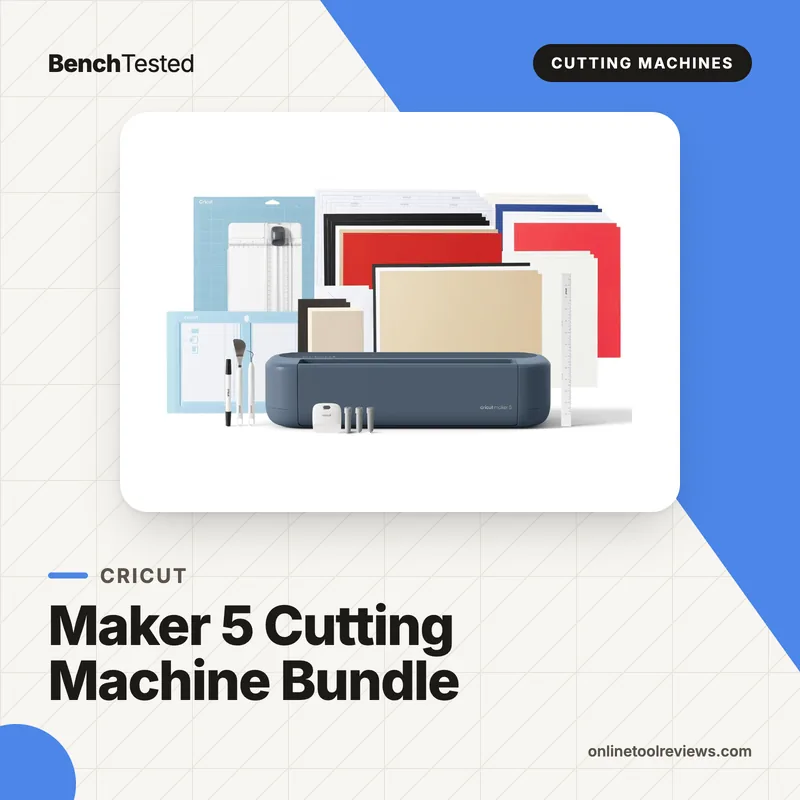
Cricut's top machine, launched in September 2026. It does everything the Explore does, and adds tools such as the Rotary Blade for fabric and the Knife Blade for material up to 3 mm thick.
- Who it suits
- Someone who will cut fabric, felt, chipboard or balsa as well as vinyl.
- What it does well
- The widest range of materials of any home cutter.
- The trade-off
- For vinyl and paper alone it costs more than you need. The Explore 5 does that work.
Check the link for current pricing.
Side by side
-
Best Overall
Cricut Explore 5 Essential Bundle
- Mat cut size
- 11.5 x 23.5 in
- Matless cut size
- 12 in x 12 ft with Smart Materials
- Cut speed
- 14.1 in/s
-
Best Alternative to Cricut
Silhouette Cameo 5 12 in Vinyl Cutting Machine, Matte Black
- Mat cut size
- 12 x 24 in
- Matless cut size
- 12 in x 16 ft (roll-fed)
- Cut speed
- —
-
Best Small Machine
Cricut Joy 2 Essential Bundle
- Mat cut size
- 4.25 x 11.75 in (large mat)
- Matless cut size
- 4.5 in x 4 ft with Smart Materials
- Cut speed
- 5.3 in/s
-
Best for Fabric and Thick Materials
Cricut Maker 5 Essential Bundle
- Mat cut size
- 11.5 x 23.75 in
- Matless cut size
- —
- Cut speed
- —
Is it worth waiting for Black Friday?
Yes, wait.
Yes. Cricut and Silhouette machines are often discounted around Black Friday (November 27) and Cyber Monday (November 30), mostly as bundles. Compare the bundle against the machine alone. The previous-generation Explore 4 and Joy Xtra may also be cut hard as stock clears, and they remain capable machines.
Buying for someone else?
The safest pick at each budget: the one least likely to be wrong for them.
-
Smaller budget
Small, simple and useful for cards and labels.
-
Bigger budget
Cricut Explore 5 Essential Bundle
The safest cutting machine to give someone who has asked for a Cricut.
How these picks were chosen
We chose one machine for each common need and compared cut size on and off the mat, speed, connectivity and software from manufacturer specifications and launch announcements, plus recurring praise and complaints from independent reviews. The Explore 5, Joy 2 and Maker 5 are 2026 releases, so owner feedback on them is still limited. Nothing was tested hands-on for this guide.